




Adaptive write request scheduling in Redpanda's Cloud Topics
Solving a Kafka problem to balance batching efficiency against latency and cost

Official Redpanda themes to add a "paws-itive" flair to your terminal






We just dropped something for the folks who live in the terminal: official Redpanda color schemes, in both dark and light variants.
Redpanda Dark gives you a warm, reddish-brown background with our signature red and orange front and center, while Redpanda Light flips it to a soft parchment base with darker brand accents for daytime readability. Both palettes are carefully tuned so greens, blues, and cyans still pop for syntax highlighting and diffs.
Configs are ready to go for Ghostty, iTerm2, Windows Terminal, Alacritty, Kitty, and WezTerm.
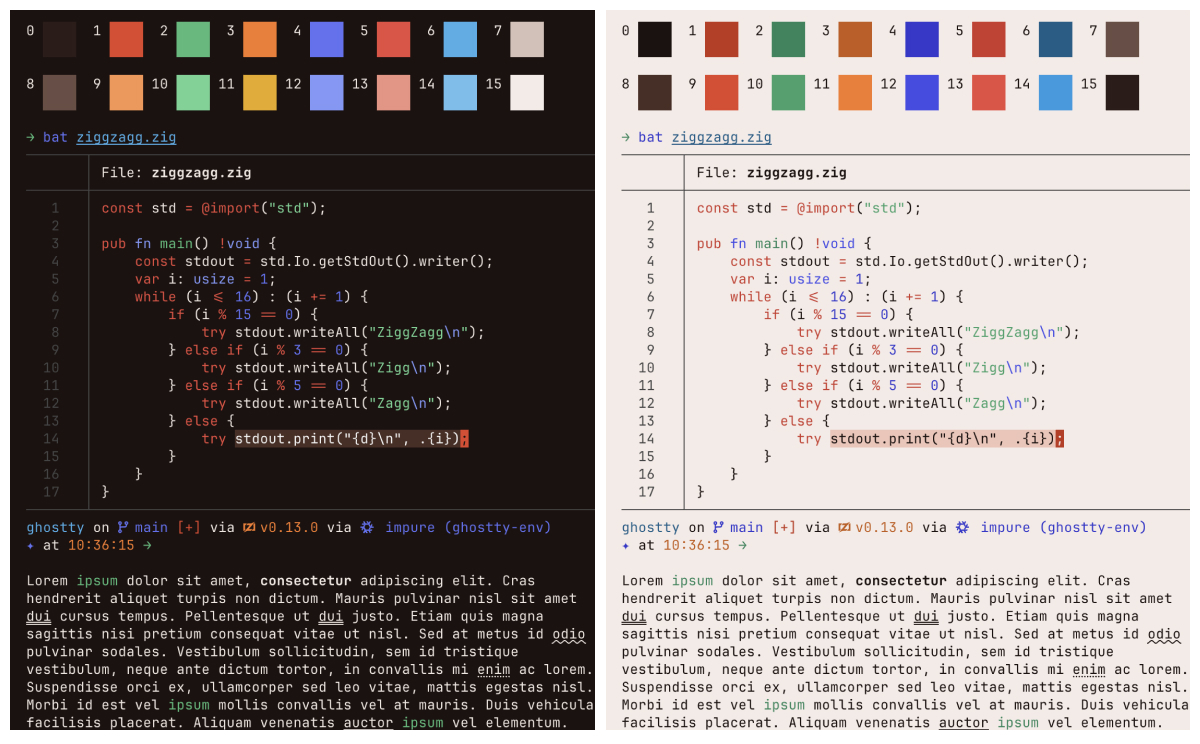
Full disclosure: these themes were generated entirely with AI. We fed Claude the Redpanda brand palette and a detailed prompt, and iterated from there. Here’s roughly what we started with:
Generate two terminal color schemes (dark and light) inspired by the Redpanda brand. Use warm red and orange as the dominant accent colors. For dark, use a warm reddish-brown background. For light, use a warm parchment tone. Shift magenta toward red and yellow toward orange to stay brand-forward. Make sure green, blue, and cyan remain distinct enough for syntax highlighting and diffs. Output config files for Ghostty, iTerm2, Windows Terminal, Alacritty, Kitty, and WezTerm.
Feel free to grab the prompt, swap in your own brand colors, and generate custom themes for your team. Installation is as simple as copy-paste, and the repo has step-by-step instructions for every supported terminal.
It’s Apache 2.0-licensed, so fork it, tweak it, PR it.
Check it out at github.com/redpanda-data/redpanda-terminal-themes.
Solving a Kafka problem to balance batching efficiency against latency and cost

The metadata tier and how we built our own key-value store into Redpanda for durability and scale

A case study in keeping Redpanda topic names from drifting with contracts
Subscribe to our VIP (very important panda) mailing list to pounce on the latest blogs, surprise announcements, and community events!
Opt out anytime.